AI Agent Handoff Workflow: Routing Work Between Tools, Agents, and People
A builder’s guide to handoff workflows for AI agents—concrete patterns, realistic examples from Pip and Masthead, failure modes, and how to keep humans in the loop without dropping work.
Quick answer
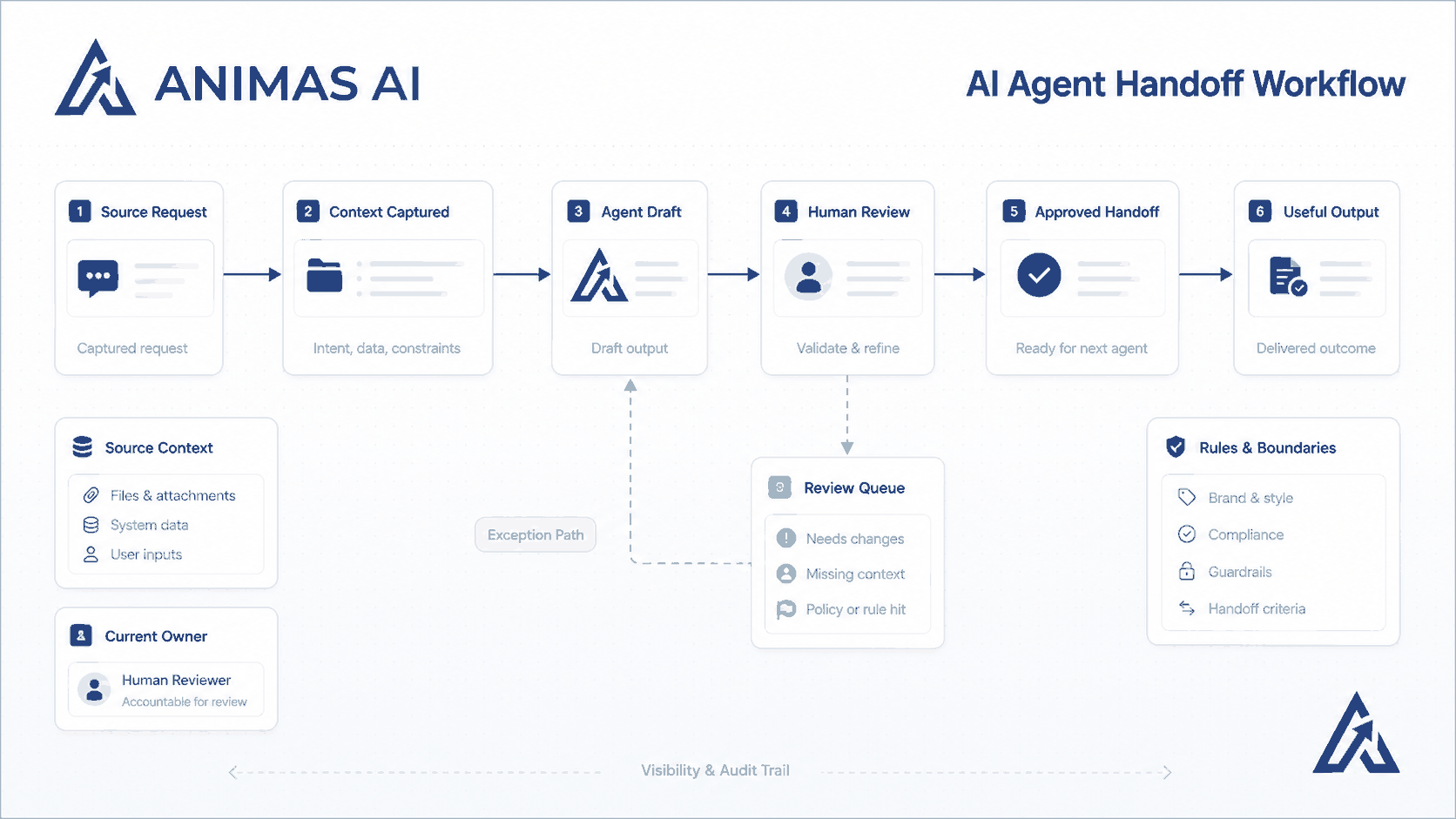
An AI agent handoff workflow is the structured transfer of a task from one agent (AI, script, or automated step) to another agent or to a human. It includes explicit ownership, state, and timeout rules so nothing gets lost. In practice, handoffs are triggered notifications, status fields, and review gates. Without them, AI outputs pile up unread, leads go cold, and the automated workflow breaks. You design the handoff to respect human judgment while moving work forward predictably.
A realistic workflow example
Take a lead qualification agent built for a hotel sales team (what we call Pip internally). The goal is to make sure no inquiry sits without a fast, informed human response.
Trigger
A group booking form submission hits a webhook. Pip’s classifier, an LLM‑based step, extracts event type, dates, budget signals, and guest count.
Owner
The Pip system owns classification and enrichment. It pulls matching CRM records, flags existing relationships, and scores urgency. No human touches the lead yet.
Handoff
Pip creates a task in the sales team’s project tool (Asana or ClickUp) with a summary: “Inquiry from Mary at TechConf Inc., 120 pax, flexible dates, budget >$20k. Recommended next step: call within 30 minutes (last year’s group spent $38k). Full notes attached.” The task is assigned to the on‑duty sales manager and the Slack channel gets a short ping. The handoff includes a due date (30 minutes) and a direct link into the CRM lead record.
Review step
The human opens the task, reads the summary, and decides whether to accept the recommendation or override it. Clicking “Take it” flips the status to *In Progress*. The system logs who accepted and when. If the person declines or can’t handle it, they reassign within the tool and Pip updates the record.
Output
The sales manager makes the call, updates the CRM, and marks the task complete. Pip registers any follow‑up date for later reminders.
Failure path
If nobody touches the task within 30 minutes, Pip escalates. It posts in a manager‑only channel tagging the sales director. After another 30 minutes with no action, it can trigger a templated “We’ll be right back” email to the sender. No message is sent without alerting a human first because a bad auto‑reply is worse than silence.
This workflow lives in a version of the system described on the Pip case study. The handoff is not a chat message that gets buried; it is a task with state and time pressure.
What breaks in real teams
Fuzzy ownership The handoff goes to a channel with no assignee. Fix with a named owner and a fallback list (primary → secondary → manager).
No timeout, no escalation AI outputs sit forever. Without an SLA timer, work never leaves the handoff queue.
Humans ignoring AI context When the handoff strips the reasoning, the human discards the output. Preserve *why* the AI recommended something, not only *what*.
Hidden failure loops If an enrichment API times out and the handoff silently skips, the human acts on incomplete data. Detect failures, retry with backoff, or hand off a task marked “Missing enrichment, review manually.”
Over‑automation before review Teams that jump to “AI replies to the client” without a review gate end up with embarrassing errors. Always build the review step first, then automate what is safe.
What to build first
Start with one handoff point where the AI does the slow part (summarizing, classifying, drafting) and a person makes the decision. The handoff should be a task, not a message. Use a simple state machine:
- Draft – AI output is ready
- In review – Human has opened it
- Approved – Action taken
- Escalated – Something went wrong
The notification must include a clear call‑to‑action, relevant context, and a link to exactly where the work happens. A no‑code tool can create a card with a status column; a small API endpoint gives more control over retry and escalation logic.
Measure two numbers right away: time to first human touch (from AI completion to status change) and escalation rate. Those tell you whether the handoff actually works.
What to avoid
Multi‑agent swarms before nailing the human handoff. A chain of autonomous agents passing work to each other is fragile if you have not learned where things break in a single human‑in‑the‑loop step.
Over‑engineering the handoff protocol. You do not need a full DAG orchestrator. A task in your project tool, a status field, and a Slack ping with a link will surface most problems.
Handing off too late when the AI is uncertain. If the AI cannot confidently classify, hand off early with “Uncertain, needs human judgment” instead of baking in a bad guess that wastes trust.
Notification‑only handoffs. Sending a summary by email without tracking whether the human acted is not a workflow; it is hope.
Assuming the human will always read the summary. Make the handoff surface short, scannable, and action‑oriented. In Masthead, the content handoff includes a checklist, a draft summary, and a one‑click “Approve and publish” button because decision speed matters.
How Animas thinks about it
We treat every agent workflow as a set of state transitions. Before writing any agent logic, we map the handoff points, assign owners (human and machine), and agree on timeouts. In Pip, the hardest part of a sales lead is the minutes after it arrives; the handoff makes human decision‑making faster by pre‑digesting the information. In Masthead, the AI drafts and the handoff to the editor is a structured review gate, not a passive delivery.
The principle: AI augments, humans decide. The handoff puts that into practice. The system never makes the final call unless the team explicitly approves full automation.
We build these workflows with pragmatic tooling. A webhook to a Python script that creates a task in a third‑party tool, or a lightweight custom orchestrator, depending on reliability needs. The constant is the focus on state, escalation, and human trust.
FAQ
When should an AI agent hand off to a human instead of continuing automatically?
When the AI’s confidence is below a set threshold, when the action requires legal or compliance review, when high‑stakes financial decisions are involved, or when empathy and personal judgment are essential. If you would want a second pair of eyes even if a senior person wrote the output, hand it off.
How do you handle agent failures during the handoff?
Make the handoff step idempotent so you can safely retry. Store task state externally so a crash does not lose work. Use retries with exponential backoff for transient failures, and alert a human if the handoff cannot complete after N attempts. A small monitoring job can ping tasks stuck in *Draft* status too long.
What is the best way to structure the handoff notification?
Include a one‑sentence summary of what the AI did, the most important piece of context (e.g., “Customer budget >$20k”), a clear call‑to‑action (“Review and approve”), a deadline, and a direct link into the tool where the reviewer works. The notification should be scannable in under 10 seconds.
Can I build an agent handoff workflow without writing code?
Yes, for simple cases. No‑code tools like Make.com or Zapier can create a task and send a Slack message. Once you need conditional escalation, retry logic, or structured reviews, a small custom script (often a few hundred lines of Python or JavaScript) gives far more control and long‑term reliability.
Source notes
- Built from shipped internal AI systems at Animas AI, including Pip (lead handoff for hotel sales) and Masthead (content handoff for editorial teams). See the Pip case study and the Masthead case study.
- Engineering patterns drawn from dozens of operational AI deployments in small and mid‑sized teams, where handoff failures were the root cause of “AI automation didn’t stick.”
- Practical principles informed by real‑world queue management and human‑in‑the‑loop design choices inside the Animas approach to AI systems.

Want this kind of system in your business?
Send the messy workflow. I will help turn it into a practical AI system.
Email Tyler