AI Agent Permissions and Access Controls: A Practical Guide for Builder Teams
How to scope what your AI agents can read, write, and trigger—least-privilege patterns, scoped credentials, audit trails, and the exact controls you need before an agent touches real data.
Quick answer
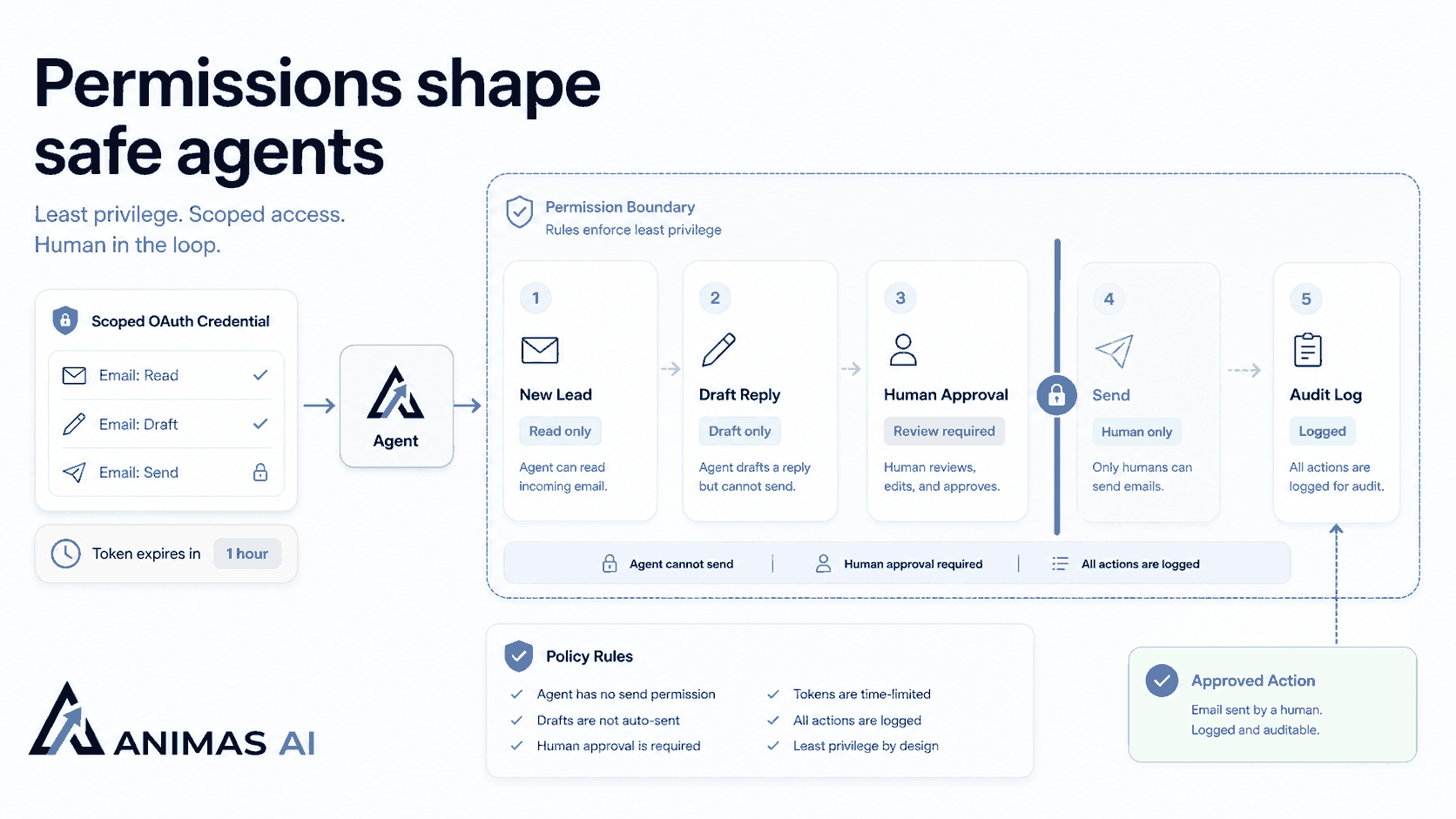
AI agent permissions depend on scope, separation of duties, and auditability, not just API keys. Give the agent least privilege: scoped OAuth tokens, human review on writes, and logged actions for traceability. In Pip, that means tokens that can read specific Gmail labels and draft replies but never send without human approval. Start with narrow service accounts, rotate secrets, and treat every action as replayable.
A realistic workflow example
Trigger and agent access
When a new email lands in the "New Lead" label, Pip’s OAuth token has `gmail.readonly` and `gmail.modify` scoped to that label, plus `gmail.compose`. The agent can save drafts but cannot send; `gmail.send` is not granted. An ops lead owns the qualification workflow.
Handoff and review state
Pip reads the email, classifies it, and drafts a reply in the "Pending Approval" folder. It then posts a Slack notification with a link to the draft, tagging the human owner. The owner reviews the draft inside Gmail and manually sends it. The lead sees a fast, accurate reply without the agent ever acting autonomously.
Failure path and credential rotation
If Pip cannot classify the email, it moves the thread to "Review Needed" and alerts the owner. The OAuth token lives for one hour and is refreshed via a rotating service account, so a leaked token expires quickly. This pattern—scoped OAuth, no autonomous sends, human approval—maintains trust as usage grows.
What breaks in real teams
The most common mistake is granting a full-access API key or blanket OAuth scope. The agent can then alter threads it shouldn’t touch or send incorrect messages. Here are specific breakdowns:
- Over-privileged tokens: A prototype Pip moved a client email to spam because of a misfired heuristic. Limiting the scope to one label prevented repeats.
- No separation of duties: When the same agent drafts and sends, there’s no human safety net. Teams often add an approval step only after a mis-send, by which point trust is already damaged.
- Long-lived, never-rotated secrets: A hardcoded API key gives departing employees indefinite access, or a server compromise leaks access to everything the agent could ever do.
- Missing audit trail: Without logging which agent performed which action, debugging becomes guesswork. No one can tell whether the agent or a human moved a deal to "lost."
- Mixed-service tokens: A token that spans both email and CRM turns both services into a single security boundary. Compromise one and both are exposed.
What to build first
Start with the smallest possible credential and expand it only when you need to. Concrete steps:
- Create a scoped OAuth service account: For Google Workspace, restrict scopes to exactly what the agent needs (e.g., `gmail.readonly` and `gmail.modify` on one label). For other APIs, use IAM or the provider’s equivalent to grant resource-level, read-only permissions.
- Use short-lived tokens that rotate: Store secrets in a vault (AWS Parameter Store, Doppler) and refresh them every hour. Hardcode nothing.
- Log every agent action at the audit level: Include timestamp, agent ID, resource, and outcome. If reads are sensitive, log those too. This also serves as a replay layer.
- Require human approval for all writes: For sending messages, modifying data, or handling money, never let the agent execute autonomously. Use a Slack notification, a pending queue, or a draft that must be approved.
- Give each agent purpose a separate credential: A classification agent and a reply agent should have distinct tokens, never a shared "general" key.
What to avoid
- Sharing API keys across agents: A single leaked key compromises everything. Isolate credentials per function.
- Blanket admin scopes: Never grant `gmail.fullAccess` or root CRUD. Figure out the smallest resource set the agent must touch.
- Skipping human review on high-risk actions: Sending email, closing a deal, altering a production database always needs a human, even for a 30-second review.
- No token expiration: Long-lived credentials are a liability. Rotate them as a routine ops task.
- Logging as the same system user: Tag every log entry with a distinct agent identity so you can pinpoint which agent caused a problem.
How Animas AI thinks about it
We design permissions into the architecture from the first commit. The principle is simple: an agent should only be able to do what a supervised junior team member could do, nothing more.
Every agent gets its own credential, scoped to exact resources. For Pip, that meant separate OAuth projects for reading leads, drafting replies, and managing follow-up labels, each with distinct scopes and token lifecycles. Write operations always require human approval. The Masthead analytics system can query and visualize data but never alter source tables; mutations happen in a separate gated pipeline.
Audit logs are a product requirement from the start. Every action is recorded and queryable. The team can ask, "What did Pip do with the Acme email yesterday at 10 AM?" and get a precise answer. This guardrail makes a bug a contained incident instead of a business disaster. When we ship a system, the client sees exactly what an agent can and cannot do, and has a dashboard showing every action.
FAQ
How do I scope AI agent permissions for Gmail?
Create a Google Cloud project and configure OAuth with scopes such as `gmail.readonly`, `gmail.modify` on specific labels, and `gmail.compose`, but never `gmail.send`. Avoid requesting `gmail.fullAccess` or `gmail.settings.basic`. For read-only workflows, use domain-wide delegation with a service account scoped narrowly so the agent only accesses mailboxes you specify.
What’s better, API keys or OAuth for AI agents?
Use OAuth when available. OAuth supports granular scopes, short-lived tokens, and refresh flows. API keys are all-or-nothing entitlements that rarely permit resource-level restrictions. For internal APIs, issue JWTs with claims that encode the agent’s purpose and allowed endpoints, and include an expiry.
How do you audit what an AI agent actually did?
Log every action (timestamp, agent ID, resource, action, outcome) in a queryable system such as CloudWatch, Datadog, or a database. Alert on anomalous patterns like a spike in drafts or accesses outside business hours. In Pip, these logs appear in a dashboard so the human reviewer sees what the agent did before approving.
Source notes
- The patterns in this guide are drawn from Animas AI’s implementation of Pip and our internal tooling for lead handling and operational workflows.
- OAuth2 scoping for Google Workspace follows standard least-privilege IAM design used by AWS and GCP, adapted for agentic systems.
- The separation of duties principle is borrowed from financial controls and applied to AI agent architecture.

Want this kind of system in your business?
Send the messy workflow. I will help turn it into a practical AI system.
Email Tyler