AI Automation Error Handling for Small Teams: Practical Patterns That Keep Systems Running
Concrete error handling patterns for AI automation in small teams: retries, dead letter queues, alerting, and manual recovery explained through a realistic workflow example. See how Animas AI ships resilient systems that don't silently break.
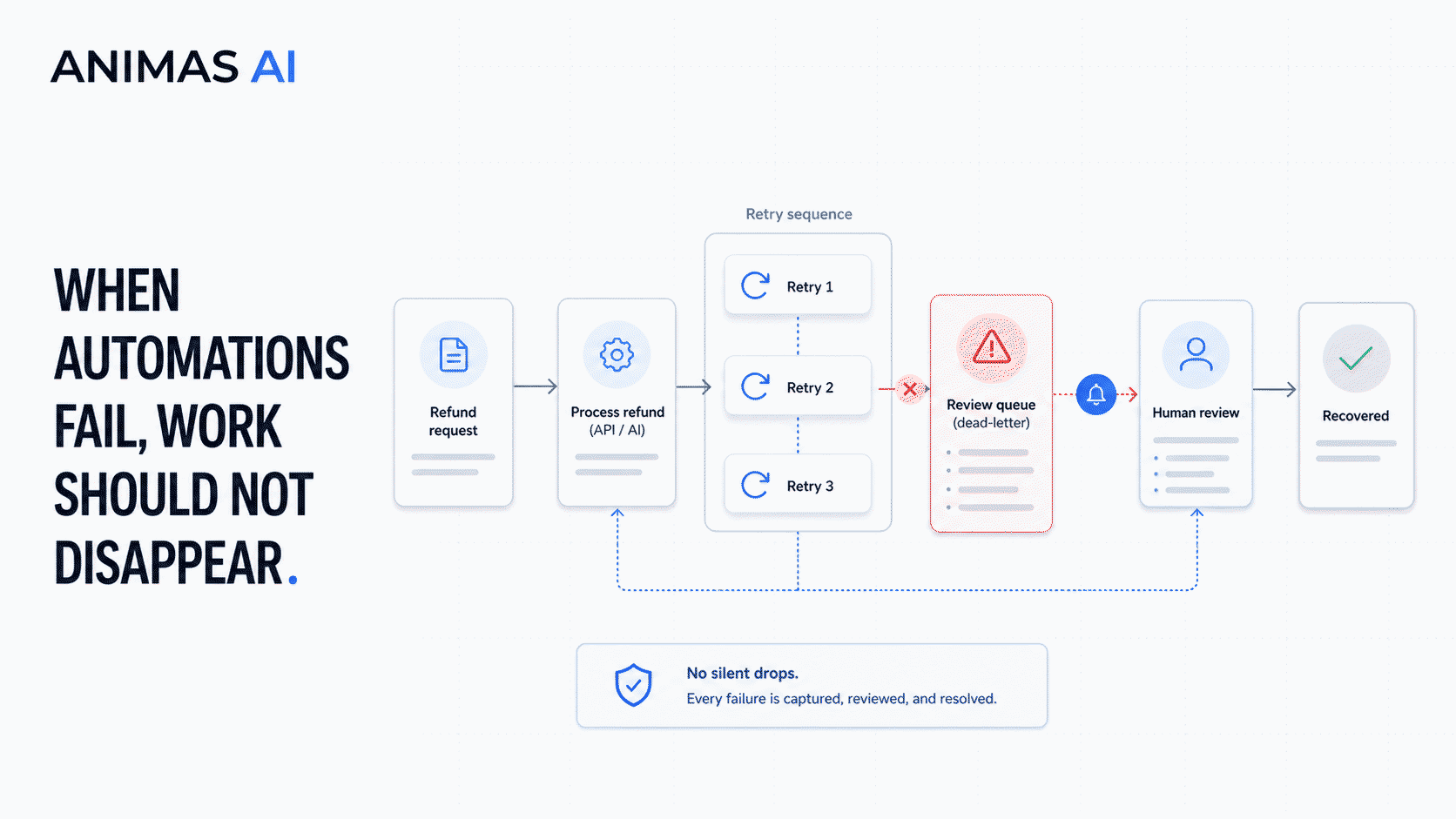
Quick answer
Error handling for AI automation means designing every workflow so failures are captured, retried intelligently, and escalated to a human when needed without dropping work or creating ghost failures. For small teams, the goal is to avoid the 3 AM scramble. You need idempotent retries, a dead letter queue for stuck items, and lightweight alerting (Slack or email) that tells someone exactly what broke and how to fix it.
A realistic workflow example
Consider a small e-commerce team using an AI agent to draft refund reply emails. The trigger: a Help Scout ticket tagged `refund_request`. The owner is the support lead, who reviews every AI draft before sending. A webhook fires to a lightweight automation layer (like n8n or a Node worker), which fetches the thread, calls an LLM to generate a draft, and saves it as a note. The lead gets a Slack notification with a link to review.
Without error handling, an LLM API timeout means no reply is generated, the ticket stays untouched, and the lead is never notified. The resilient version:
- Retry logic: The worker catches the timeout and retries up to three times with exponential backoff (1s, 4s, 16s).
- Dead letter queue: If all retries fail, the ticket ID, payload, and error context are pushed to a dead letter table in Airtable or a simple JSON file.
- Alerting: A Slack message fires to `#ops-alerts`: "Refund-draft agent failed for ticket #2471 after 3 retries. Reason: LLM API timeout. Manual draft needed."
- Manual recovery: The support lead opens the ticket, writes the reply manually, and later resolves the dead-letter record.
This pattern (retries, failure bucket, clear alert, manual fallback) is exactly what Animas AI uses in Pip's email-digest pipelines and Masthead's media-processing agents.
What breaks in real teams
Silent failures. A workflow hits a non-200 response and stops. Nobody knows because the only log is buried in a cloud console nobody opens unless something else explodes.
Automated flows with no human handoff. A lead-routing agent misclassifies a high-value inbound message and drops it into an unchecked bucket. Without a review state or alert, that lead is effectively lost.
Cascading delays. A scheduled job that depends on an upstream data pull fails once, then blocks all downstream tasks. The team only notices when a weekly report goes missing.
Alerts that lack useful context. "API error 500" without the payload, the failed step, or a link to the source record is useless at 2 PM on a Friday; it's worse at 2 AM.
In one early Animas tool, a media-processing agent silently truncated large image uploads. A health-check job that compared expected vs. actual output counts and pinged Slack on a mismatch prevented dozens of blind spots.
What to build first
Start with the three things that prevent the most common phone calls:
- Idempotent retries with a cap. Wrap every external call (LLM API, third-party service, database write) so transient failures retry automatically. Use exponential backoff and stop after three attempts. Never retry on permanent 4xx errors that will never succeed without a change.
- A dead letter queue for unretryable tasks. A locked Airtable view, a dedicated Slack channel, or a pinned Notion database is enough for a team of five. Each record must carry the raw input, timestamp, error message, and a link back to the source system.
- One alerting rule that hits the team where they already are. A Slack message to `#ops-alerts` with the failed step, the reason, and a direct link to the failing record lets someone recover in under two minutes.
Animas ships every agent workflow with a lightweight "airbrake": a small Node.js function that catches unhandled rejections, logs context, and posts to a shared Slack channel. That simple step turns silent failures into visible problems immediately.
What to avoid
Ignoring the human fallback path. If a workflow has no manual override state, a minor API outage creates a customer-facing hole that no one can patch.
Over-engineering with enterprise tooling. A script that writes to a Google Sheet and sends a Slack message is far more likely to be maintained than a platform that requires a dedicated ops person.
Blind retrying everything. Malformed payloads (bad JSON, missing required fields) will never succeed. Log the error once and move it straight to the dead letter queue so a human can decide what to do.
Hiding errors in dashboards nobody visits. If the team must log into a metrics tool to discover a failure, they will find it only after a customer complains. Push errors into the tools they use daily.
How Animas thinks about it
Animas treats error handling as part of every automated flow's design. For Pip's email-digest agent, Masthead's content-transformation pipeline, or an internal lead router, we map failure modes early: What if the LLM call times out? What if the CRM webhook returns a 429? Who needs to know, and what do they need to do?
Those answers become a small set of reliable patterns a small team can operate: a retry wrapper around every API client, a dead-letter store (often Airtable) that captures the raw payload, a human-readable Slack alert that links to the failing record, and a manual recovery path (such as a button that re-queues the job or a clear note with exact steps).
These aren't abstract ideas. For example, when Pip's reporting pipeline can't generate a weekly summary because a weather API returns a 503, the job fails into a manual review step. A Slack message fires, and the operator can re-run the job later or publish without the weather section. No dropped work, no blind panic. Learn more on the Pip case study and Masthead case study.
FAQ
What is a dead letter queue in AI automation?
A dead letter queue holds tasks that failed after retries exhausted. It stores the original input, error details, and a timestamp so a person can investigate later. For small teams, it's often a simple database view, a read-only Slack channel, or a pinned Notion table. The point is to keep failed work visible and recoverable, not lost in a black hole.
How many retries should I use for AI API calls?
Start with three retries and exponential backoff. More than three attempts on a transient error like a 503 is usually wasteful; fewer than two may miss a brief outage. Never retry on 4xx errors (invalid API key, malformed request) because they will never succeed without a code or configuration change. Always cap the total retry time at a few minutes so the workflow does not hang indefinitely.
How do I alert my team about automation failures?
Use a channel your team already monitors. A Slack message with the workflow name, failed step, error message, and a direct link to the failing record is enough. If the team is noisy about alerts, create a dedicated `#automation-alerts` channel and set notification rules that ping `@here` only for failures that block a time-sensitive process. For critical workflows (like e-commerce order failures), escalate to PagerDuty or an on-call rotation.
What should I do when an AI workflow fails completely and the retries do not help?
When all retries fail and the task lands in the dead letter queue, you need a manual recovery step. Document exactly what a team member should do, ideally inside the alert itself. After the incident, review dead letter records monthly to spot patterns: a flaky API, a model that needs a fallback, or a step that can be split into smaller, more robust pieces.
Source notes
Based on Animas AI's own shipped systems (Pip's automated reporting agents, Masthead's internal content pipelines) and common resilient engineering patterns like idempotent retries, dead letter queues, and circuit breakers. No external client names or private metrics were used. The goal is to share concrete, low-ceremony error-handling approaches that keep small-team automations running without dedicated ops staff.

Want this kind of system in your business?
Send the messy workflow. I will help turn it into a practical AI system.
Email Tyler