AI Automation for Customer Intake Workflows: A Practical Guide
How to use AI to capture, qualify, route, and follow up on customer inquiries without dropping leads or overloading your team. A builder’s guide with concrete workflow patterns and real pitfalls.
Quick answer
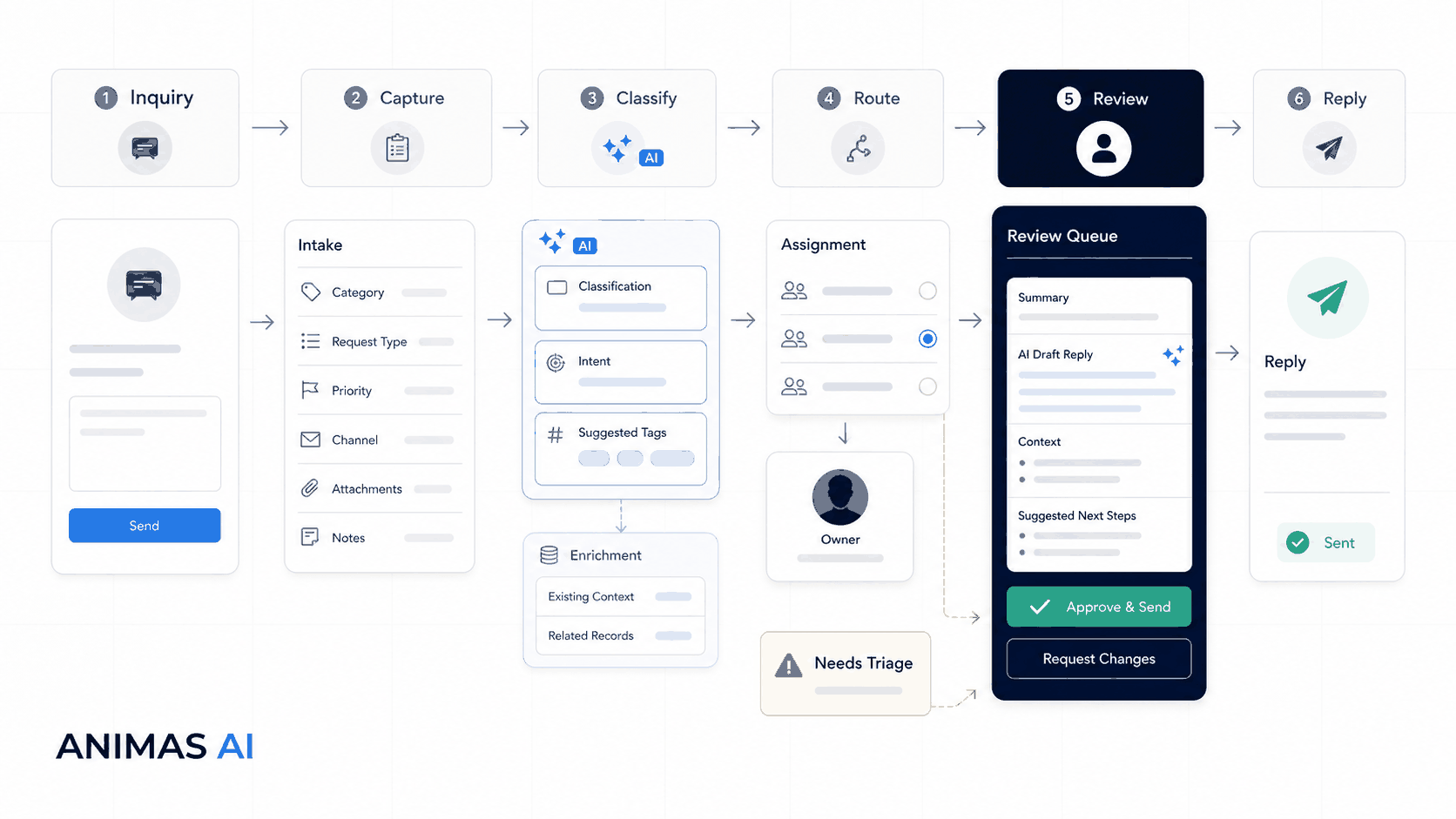
AI automation for customer intake takes an inbound inquiry through capture, classification, enrichment, routing, and drafting, then pauses for a human to review and send. The loop is trigger → capture → classify → enrich → route → draft → review → act. It cuts response time, removes manual triage, and never sends a message a person hasn’t approved.
A realistic workflow example
Owner: Head of operations (or whoever triages inbound email and forms today). Trigger: A prospect submits a contact form that captures name, company, service interest, and a free-text message.
- Capture and acknowledge – A webhook posts the form fields to an automation layer (Make, n8n, or custom code) and calls an AI service. The AI classifies the inquiry by service type and urgency, then drafts a short acknowledgement. The draft lands in a review queue and a Slack or SMS notification pings the intake coordinator. Output: structured JSON (service_type, urgency, draft_reply).
- Enrich and route – The automation creates a record in the team’s workspace (Airtable, Notion, CRM) with the raw inquiry, AI tags, and any matching CRM profile. Based on service_type, the record is assigned to the right specialist. The specialist gets a one-click link to the record and draft.
- Human review – The specialist opens the record, adjusts the draft if needed, and clicks send. The system logs who acted and when. If the AI’s classification confidence falls below 0.85, the record goes to a shared “Needs triage” queue. A coordinator assigns it manually; the tag stays as a suggestion, not a final routing.
- Follow-up loop – If four hours pass without a reply, Slack pings the specialist with a prewritten follow-up note from the AI. They can send it or skip it.
On a warm path, the entire flow from form submission to human-approved reply can finish in under three minutes. No automated email goes out without a person seeing it first.
What breaks in real teams
Even a solid intake automation breaks down if you ignore where people and process still matter.
- Classification without a fallback – A pricing request tagged as partnership sits unread. Flag low-confidence tags so a person double-checks them.
- Auto-booking without qualification – A bot that drops calls straight onto the calendar fills slots with people who aren’t ready. Screen first, book later.
- Edge cases that fail silently – A support request submitted through the sales form matches nothing and vanishes. The system must catch unrecognized inputs and hand them off to a person.
- Team bypasses the tool – If the review step feels heavier than typing a quick email, the specialist ignores the system. The automation becomes noise.
- AI that invents commitments – A draft reply that promises a turnaround your team can’t hit creates expectations no one agreed to. Show the reasoning behind each draft, and require a deliberate human click to send.
What to build first
Don’t jump to a chatbot that picks up scope discussions. Start with the smallest loop that takes the most painful manual step off someone’s plate.
- Instant, human-sounding acknowledgement – Swap the generic auto-responder for a short note the AI drafts and a person approves once. Prospects notice you’ve already picked up on their need.
- Basic keyword routing – A simple rules-based classifier tags inquiries by topic and sends them to the right person. You’ll find the fuzzy edges before adding AI enrichment.
- Draft-only reply, always human-approved – Build a review stage where the assigned person sees the AI suggestion and can edit in one click. Non-negotiable early on.
- Lightweight record in a shared space – Put intake data where the team can see it, comment, and mark it done. An Airtable base with the raw inquiry, tags, and an “Approved?” column is enough.
These three pieces (acknowledge, route, and draft-review) cut response time from hours to minutes and never risk a bad email. Once you trust that loop, layer on CRM enrichment, follow-up nudges, and optional meeting scheduling.
What to avoid
- Black-box AI decisions – When nobody can see why a lead went to a certain rep, trust disappears. Show the classification logic and the confidence score.
- Forcing AI into every channel – High-trust channels like a partner’s direct email may be better left untouched until the pattern is solid on high-volume web forms.
- Skipping manual override – Every automated step needs a “pause” or “assign to human” exit. Without it, something sensitive will eventually route into the void.
- Building a magic bot that overpromises – An intake AI captures and qualifies, then sets up the real conversation. It does not negotiate or commit to anything.
- No feedback loop – If the reviewer corrects a classification or edits a draft, capture that signal. A system that never learns from corrections becomes busywork.
How Animas AI thinks about it
At Animas AI, we start with the person who will own the outcome. The intake loop is capture, enrich, route, review, act, and follow-up. Each step has a clear trigger, an owner, and a fallback. AI adds the most value in enrich and route—classifying text, pulling context from other systems, suggesting the next move. It never works alone at the review or act stage. This pattern came from the Pip agent-driven email workflows that parse messages, pull out tasks, and hand them to a person for approval, and from Masthead, where content operations rely on similar capture-and-review loops. In both systems, the AI cuts noise and drafts a starting point; the human decides.
We skip big all-in-one platforms. We wire together tools the team already uses—form, spreadsheet or CRM, Slack or email—and add just enough AI for the repetitive classifying and drafting. It feels like a small operations tweak, not a new software rollout. The system shows its work so the team can read and correct a misclassification in plain language. The test: if the person receiving the handoff can’t say in one sentence what the system did and why, it’s too complex. Good intake automation surfaces the invisible work and keeps the human driving.
FAQ
Can AI handle complex B2B customer intake?
Yes. The AI classifies the request, pulls related CRM data, and drafts a reply that would typically take a person 15 minutes. Complexity gets managed by routing to the right expert, not by the AI carrying the conversation. A human always reviews and personalizes the message before it goes out.
How do I keep AI from sending incorrect or off-brand responses?
Never let the AI send without human review. Give it clear constraints in the prompt: tone, what it can say, what to leave out. When a reviewer changes a draft, log the edit so you can improve the prompt later.
What’s the fastest way to start automating customer intake?
Start with the acknowledgment. Build an automation that listens to form submissions, asks AI to draft a short personalized reply, and posts that draft into Slack or a spreadsheet for a human to approve and send. You’ll have a working loop in an afternoon.
Do I need a full conversational AI chatbot?
Almost certainly not. A well-designed form with smart follow-up questions often collects better data and is easier to integrate into a review workflow. Reserve conversational AI for later, after the capture-route-review loop proves itself on high-volume, low-complexity inquiries.
Source notes
This guide draws on patterns from the structured capture, classification, and human-review handoffs in Pip (agent-driven email workflows) and Masthead (content operations). No private client data or made-up case studies. For more on keeping people in control, see Human in the Loop AI Automation.

Want this kind of system in your business?
Send the messy workflow. I will help turn it into a practical AI system.
Email Tyler