AI Automation Maintenance Checklist: Keeping Workflows Reliable Over Time
A practical maintenance checklist for AI automations covering monitoring, prompt drift, provider changes, permissions, retries, and owner review. Built from shipped systems at Animas AI.
Quick answer
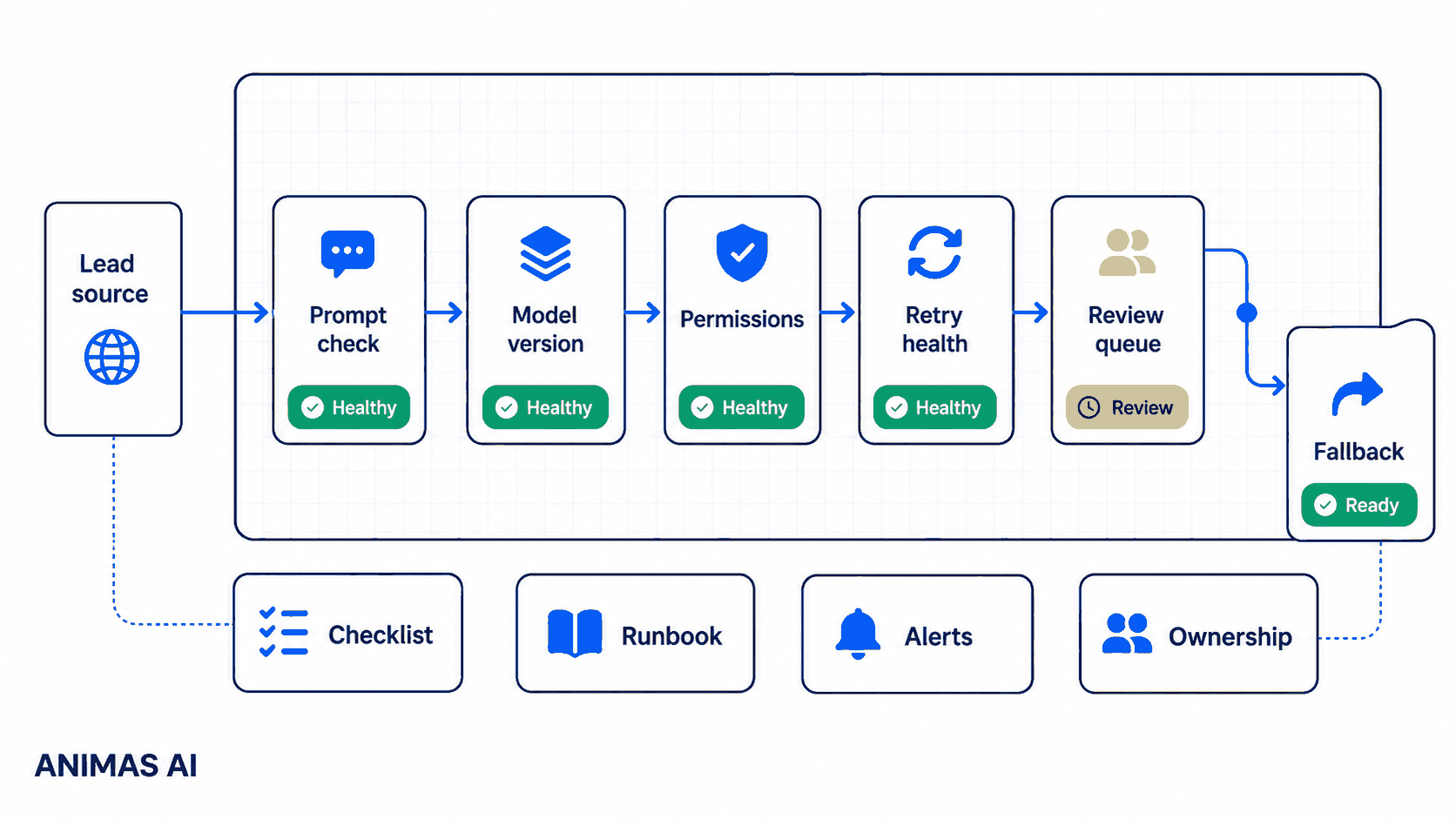
AI automations drift over time. A maintenance checklist keeps prompts consistent, catches silent provider model changes, confirms permissions haven’t expired, and makes sure review steps still fire. For the operational tools we ship at Animas, the checklist runs weekly or after any integration change. It covers prompt regression tests, retry health, permission scans, owner review cadence, and a human fallback that activates when the automation can’t resolve a case.
A realistic workflow example
Suppose a consulting team built an AI workflow to qualify leads. A webhook fires on form submission, the AI scores intent and drafts a reply. Above threshold, the draft posts to Slack with an approve-and-send button; below, it’s archived.
Maintenance lands on the ops lead:
- Owner: The ops lead (not the original builder).
- Trigger: A recurring Monday calendar hold plus an alert if no lead is processed in 48 hours.
- Handoff: The ops lead replays 10 historical leads to check prompt behaviour, inspects webhook logs for auth errors, and confirms the Slack bot’s channel permissions.
- Review state: If the prompt now adds a tone the founder hates, it’s flagged for tuning. If a permission has expired, the automation is paused and new leads flow to a manual triage board.
- Failure path: A monitoring script watches for three consecutive failures and sends a phone alert. It also posts in the team channel asking for manual coverage.
This pattern isn’t hypothetical. It’s how we build maintenance into Pip. The automation stays owned, health-checked, and ready to degrade safely.
What breaks in real teams
The most fragile piece is not the code. It is the context drift that accumulates silently.
Prompt drift occurs when a model update changes output style or structure without warning. A casual two-sentence email turns into a five-paragraph formal reply. Your team only notices when a client says, “That doesn’t sound like us.”
Provider model changes are worse. Providers deprecate versions, auto-upgrade, or adjust defaults. If you pinned a dated snapshot, it may still disappear. Every downstream parsing step needs a retest.
Permission rot hits when a service account token expires, a Slack app is reinstalled without scopes, or a Google Drive folder is tightened. The automation stops, but the 403 error sits unread until someone asks why the reports stopped appearing.
Retry exhaustion silently drops work. Three retries, then nothing. At Masthead, a content enrichment step lost editorial leads when a third-party API changed its schema. The fix was a dead-letter channel with a human triage duty, not more retries.
Owner drift is the final blow. The builder leaves, and nobody knows where the prompts live or why the threshold is 0.75. The automation runs until it breaks and becomes a black box nobody wants to touch.
What to build first
Start with a single-page checklist that lives next to the runbooks, not in someone’s head. A Notion doc or a markdown file works.
- Prompt regression test. Keep 5–10 representative inputs and expected output shapes. Replay them weekly and flag differences above a similarity threshold.
- Model version check. Confirm the pinned model is still available. Schedule a cutover window if a deprecation notice arrives.
- Permission scan. Verify every service account, API key, and bot token is active and has the correct scopes.
- Failure alert wiring. Ensure the retry ceiling sends an alert to a human channel. Dead-letter queues (we use simple Google Sheets rows for Masthead) need a triage owner assigned weekly.
- Owner audit. Record the current human owner. Update the runbook when ownership changes. Schedule quarterly reviews.
What to avoid
- Relying on “it’s still running” as a health signal. Lead routers have kept running while a model tweak turned subject lines into nonsense fragments.
- Over-engineering self-healing loops that auto-tune prompts without a human review step.
- Ignoring provider deprecation calendars. Treat model sunsets as planned maintenance, not emergencies.
- Forgetting that permissions are temporary. OAuth tokens expire; service account keys rotate. Build your checklist to catch these early.
- Building without a human fallback. Every automation needs a designated channel where incomplete work lands automatically, rather than waiting for someone to notice the silence.
How Animas thinks about it
At Animas, every shipped system includes a maintenance surface. This isn’t a product; it’s a set of habits.
For Pip, the lead-routing assistant, we bundle a prompt regression kit and display the last successful processing timestamp. When the timestamp goes stale, the team checks before leads pile up. The orchestration layer tracks retry exhaustion and posts dead-letter items with the original payload.
For Masthead, the editorial assistant, we pin model versions and include a human review state. The maintenance checklist adds a weekly taste test where an editor evaluates a handful of AI-generated summaries. If the tone drifts, we tune the prompt and deploy a revision, keeping the old version as a fallback.
We also ask maintenance questions during scoping: “Who owns this in six months? What’s the fallback when it breaks? How will you know if output quality degrades?” These questions shape simpler integrations, explicit logs, and a human-run review step no model update can bypass.
The maintenance checklist becomes a living artifact, pinned in the client’s knowledge base and project channel. It is the same list we run when supporting a system post-launch. You can see this philosophy reflected across all What I build: internal tools that never become black boxes. We ship the operator’s manual alongside the code.
FAQ
How often should I run an AI maintenance checklist?
For most small-team automations, weekly is a good rhythm. Add a daily health-check script for time-sensitive workflows, and run the full checklist after any integration change, token rotation, or model swap.
What’s the simplest way to catch prompt drift?
Keep a spreadsheet with 10 historical inputs and their approved outputs. Replay them through the current configuration and diff the results. Look for significant changes in length, tone, or structure.
Do I need a dedicated monitoring tool?
Not at first. Calendar reminders, a checklist doc, and a few health-check scripts cover most needs. As workflow count grows, you might add a lightweight dashboard, but the human triage habit matters more than the tool.
Who should own the maintenance checklist?
An operational role, not necessarily the original builder. The person needs enough context to recognize wrong outputs and the authority to pause the automation or request a fix. In small teams, this is often the ops lead or a tech-savvy manager.
What’s the biggest failure point most teams overlook?
Human fallback decay. Over time, the manual backup (email alias, Slack triage channel) falls out of use. When the automation breaks, nobody notices because the fallback path is also broken. Rehearse the fallback at least once a quarter: turn off the automation deliberately and confirm the work still gets handled by a person.
Source notes
This article is built from direct experience shipping AI automations at Animas AI, including the Pip and Masthead systems, and from observing failure patterns in small-team operational tools. The concepts of prompt drift, permission rot, and owner drift emerged from real maintenance cycles. For a deeper look at the systems mentioned, see the Pip case study, the Masthead case study, and the full Work section.

Want this kind of system in your business?
Send the messy workflow. I will help turn it into a practical AI system.
Email Tyler