AI Operations Dashboard for Small Business: A Practical Guide
A no-fluff look at AI operations dashboards for small teams: what they are, what a realistic workflow looks like, what breaks without one, what to build first, and how Animas AI keeps human judgment at the center of every shipped system.
Quick answer
An AI operations dashboard for a small business is a single view that shows the health of your AI-driven workflows, not generic business metrics. It tells your team what the AI is doing right now, which tasks need human review, what has failed, and whether automations are hitting their SLA targets. For a founder-led team running multiple agents or pipelines, the dashboard is the control surface where humans and AI hand off work, and nothing falls through the cracks.
A realistic workflow example
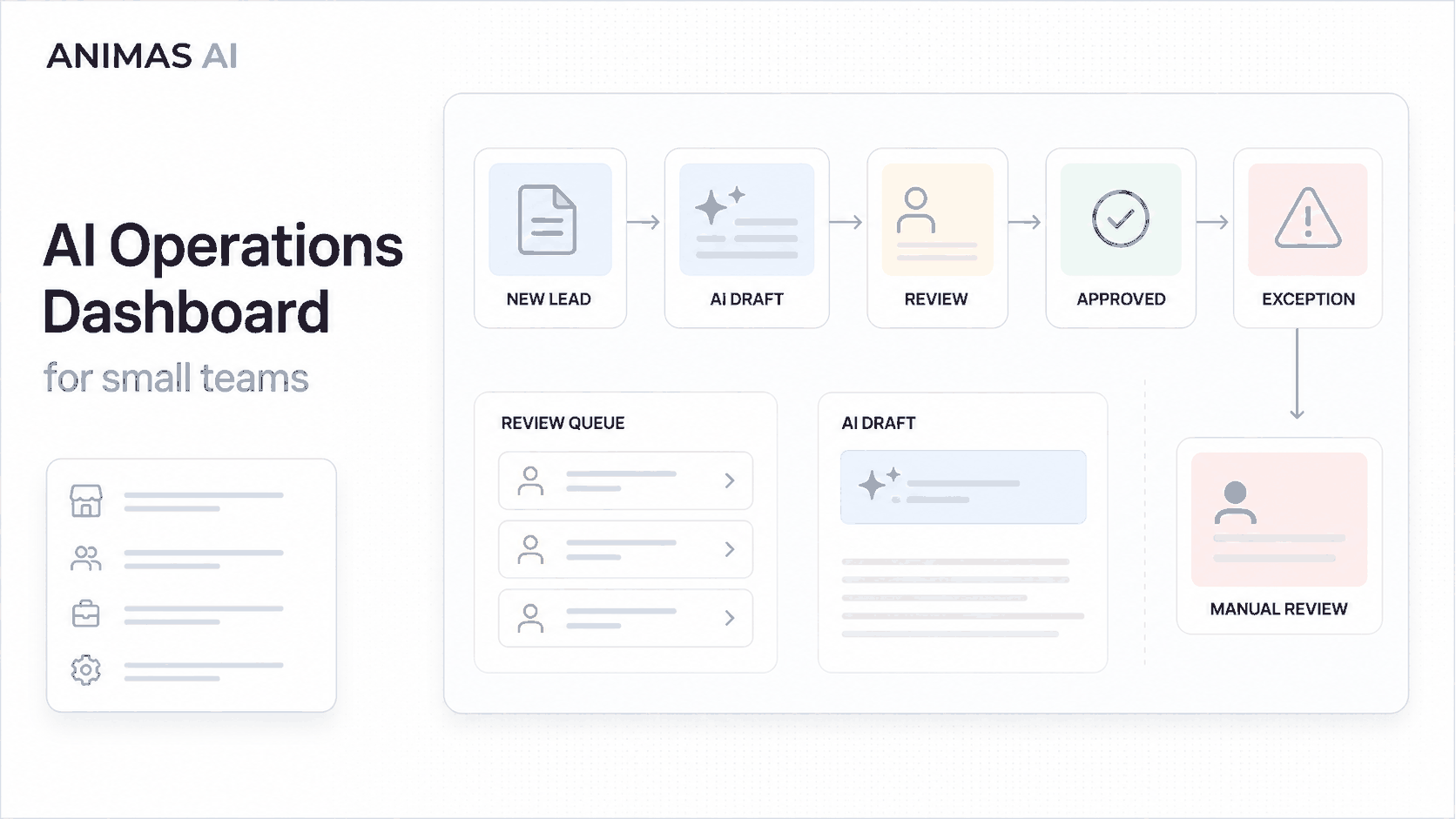
Take a 12-person consulting firm that uses an AI pipeline to handle inbound leads. Each lead from the website triggers a workflow:
- Trigger: A new form submission lands in a Google Sheet or CRM.
- Owner: The sales manager (or operations lead) is accountable for response times.
- AI process: An agent (like Pip, which we built at Animas) analyzes the lead, drafts a personalized reply, and flags it for review.
- Review step: The draft appears in a dedicated AI operations dashboard. The sales manager sees a queue of pending reviews, each with a summary, the suggested reply, and a timer showing how long it has been waiting.
- Output: With one click, the manager approves, edits, or rejects the draft. Approved replies go out via email or the original channel. The dashboard logs the outcome and moves the lead to “responded.”
- Failure path: If the AI fails (bad data, edge case), the dashboard shows an exception. The manager is alerted and can manually handle the lead. No lead goes unnoticed.
The same pattern works for content operations. In Masthead (our content-operations tool), editors see a queue of AI-generated article drafts: status, topic, readiness for review. The dashboard makes it obvious which pieces are stuck and who should act.
What breaks in real teams
Without an operations dashboard, AI automations quickly become a black box. Common headaches:
- Review bottlenecks: AI drafts pile up because nobody realizes they’re waiting for attention.
- Missed exceptions: A task fails silently; days later someone discovers a lead never got a reply or an email bounced without a fallback.
- Duplicate work: Two team members inadvertently handle the same item because there’s no shared view of what’s in progress.
- Accountability gaps: When something goes wrong, no one owns the outcome. The dashboard creates a paper trail and a clear owner for every review step.
- SLA drift: If you promised a 5-minute reply, how do you know if the AI and human loop actually hits it? You won’t know unless the dashboard measures it.
What to build first
Don’t try to build a full-scale operations console on day one. Start with the smallest useful surface:
- Single-workflow status board – For your most critical automated process, show three things: tasks pending human review, tasks running, and recent failures.
- Time-based alerts – Highlight items waiting longer than your target SLA. A simple “3 leads over 15 minutes” flag is more valuable than a dozen fancy charts.
- One-action approval – Let the responsible person accept or edit the AI’s output directly from the dashboard. This closes the loop and keeps the workflow moving.
- Exception log – Collect errors with timestamps and context, so you can spot patterns and tighten the automation later.
Once that’s stable, you can layer on business-outcome metrics (reply-to-conversion rates, average handling time, editor throughput) but only when the basic health signals are working.
What to avoid
Here are common pitfalls to steer clear of:
- Big BI rewrites – An AI ops dashboard is not a replacement for your company’s KPI tool. It’s a narrow-purpose window into automations. Mixing the two creates noise.
- Dashboard before workflow – Build the automation first, then add the dashboard. Don’t build the control panel before the automations are running.
- Over-engineered visuals – Real-time pie charts and animated donuts distract from the signals that matter. Prioritize queues, timers, and status badges.
- Post-mortem blame loops – Use the dashboard to surface exceptions for learning, not for shaming. If the AI gets it wrong, the team should correct fast, not assign blame.
- Ignoring the human step – Every dashboard item must have a clear next action for a human owner. Showing “AI completed” without the required action leaves people confused.
How Animas thinks about it
An AI operations dashboard links agent automation and human judgment. It makes the AI’s decisions visible, so a person can take over with the needed context already on screen.
In shipped systems like Pip, the dashboard didn’t just monitor; it operated the workflow. Sales managers saw a queue of leads, read the AI-drafted reply, and approved or edited with one click. That control surface turned a chaotic process into a one-person oversight job, cutting response times. For Masthead, the editorial dashboard gave the content team a shared inbox of AI-generated pieces. The queue showed each article’s state, suggested next action, and history, so nothing got orphaned.
The same principle fits any workflow. Your dashboard should mirror the actual handoff points, giving a person the power to see, decide, and act without chasing information. That’s the philosophy behind our solutions. We build dashboards that prevent operational drift.
FAQ
What’s the difference between an AI ops dashboard and a regular business dashboard?
A business dashboard tracks company-wide KPIs (revenue, pipeline, customer count). An AI ops dashboard is scoped to a handful of automated workflows. It shows live task states, AI outputs, review queues, and exceptions: operational signals that tell you whether your automations are healthy.
Do I need a custom dashboard, or can I just use off-the-shelf tools like a project-management board?
A Kanban board (Trello, Notion) works for simple flows. But once you need SLA alerts, integration with your AI stack, or domain-specific actions like approve-and-send in one click, a custom dashboard, even a simple one, pays back quickly. The bar is low; you’re building a companion, not an enterprise control tower.
How much does it cost to build an AI ops dashboard for a small business?
It depends on complexity, but we often ship a useful first version alongside the automation itself. Since the dashboard is part of the workflow’s design, the cost is absorbed into the overall automation build. We build minimal viable dashboards that handle queues and exceptions, keeping the initial investment accessible for growing teams.
Can’t I just get alerts by email instead of building a dashboard?
Email alerts work for a handful of tasks, but they quickly become noise. When you have dozens of AI-drafted items to review daily, an inbox full of individual notifications obscures the real bottlenecks. A dashboard gives a single, sortable view and a way to act immediately. The inbox is better for one-off nudges, not for sustained workflow management.
Source notes
This article draws on Animas AI’s experience shipping operations dashboards with Pip and Masthead. The patterns are based on real workflows, failure modes, and the conviction that a human-in-the-loop system needs friction-free visibility. For deeper dives, see our guides on human-in-the-loop AI automation and AI agent handoff workflows.

Want this kind of system in your business?
Send the messy workflow. I will help turn it into a practical AI system.
Email Tyler