AI Workflow Automation for Business Operations: A Concrete Guide
A no-fluff walkthrough of AI workflow automation: triggers, review states, and fallbacks that actually hold up inside real business operations.
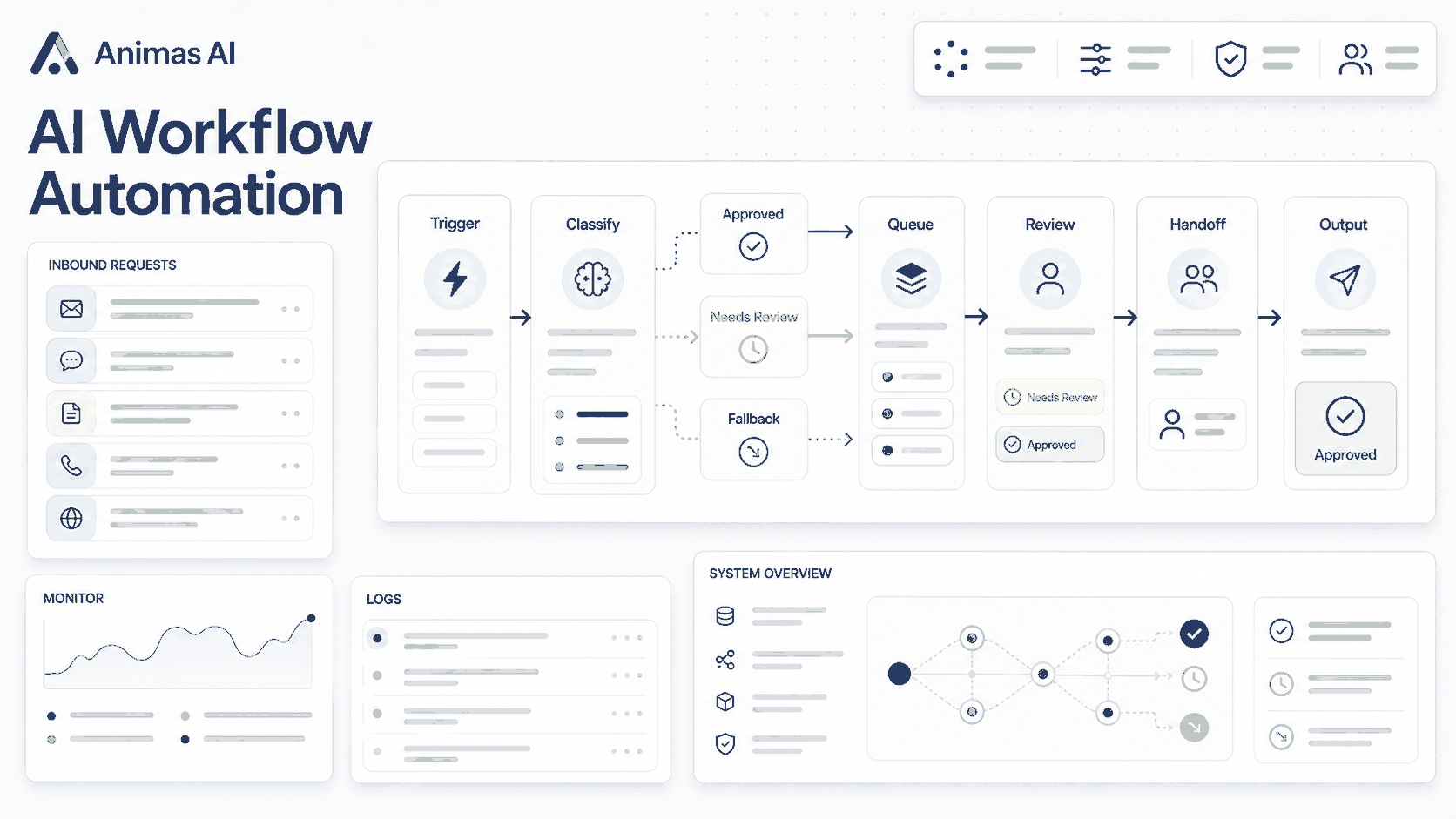
Quick answer
AI workflow automation for business operations means wiring everyday operational steps (triage, routing, drafting, approval) to event-driven agents and language models. It's less about spinning up paragraphs and more about linking a trigger like a new form submission to an owner, a review checkpoint, and a fallback path for low-confidence cases. Done right, the drudgery disappears, but human judgment stays exactly where it matters.
A realistic workflow example
A small consulting firm handles 150 inbound inquiries a week through a website form. The automated flow:
- Trigger: A new form submission hits a webhook.
- Classification: An AI agent extracts the service type, urgency signals, and contact details. It outputs a JSON object with those fields and a confidence score from 0 to 1.
- Triage: High confidence (>0.85): auto-sends a personalized template from the relevant partner’s mailbox. Medium confidence (0.65-0.85): drafts a response and posts it to a Slack channel for review. Low confidence: routes only the extracted data to a human with a “needs triage” label.
- Owner: The partner who handles that service line receives a Slack notification with a deep link to the draft and the original submission.
- Review: The partner approves with one click, edits inline, or discards. The decision is logged so the classification model improves over time.
- Output: The client hears back in 2 minutes for high-confidence cases, or 15 when a human reviews. Low-confidence inquiries go to a person for manual handling, still within the same SLA.
What breaks in real teams
- Missing review states: Without a medium-confidence review path, one visible AI mistake often causes the team to switch off the entire automation.
- Trigger drift: A source system changes a field name or stops sending webhooks silently. Two weeks later, a manager notices the leads went cold.
- Ownership ambiguity: The workflow fires, but no one knows who reviews. Drafts sit orphaned in Slack with no acknowledgments.
- Confidence models that never learn: If human review decisions aren’t fed back to the model, the AI repeats the same classification errors.
- Over-automation before standardization: Automating an inconsistent human process just speeds up the inconsistency. The team ends up debugging AI decisions instead of doing the work.
What to build first
Start with a single operational step that has a stable trigger, low downside if the AI errs, and a quick human check. A safe first project: automatically categorizing inbound emails and dropping them into the right Slack channel, each with an AI-written one-line summary. If the category is wrong, someone moves it manually. The team still saves loads of scanning time.
Run the whole thing in shadow mode first. Let the AI perform the full task in the background for a week, logging every action it would take without touching anything live. That builds monitoring instincts and lets the team gauge its judgment before any automation reaches the real world.
What to avoid
- Skipping human review for external output: Any AI-generated text that customers, partners, or vendors will see needs at least a sample audit path.
- Treating AI output as final: Show drafts side-by-side with the source data so reviewers can verify quickly.
- Synchronous AI calls: When a trigger fires, don’t block the workflow waiting for a 30-second AI response. Queue the job and update status asynchronously.
- Deploying without monitoring: If you can’t tell whether a workflow produced garbage, don’t put it in production. Log every decision, timestamp it, and make replays easy.
- Replacing deterministic rules with probabilistic AI: If a rule always holds (e.g., “lead from X country routes to Y partner”), keep the rule. AI is for the fuzzy edges.
How Animas thinks about it
We treat AI workflows as operational plumbing, not magic. Flows are built around events, owners, review states, and fallback paths first. The language model only steps in when messy data needs sorting or a template won’t cut it.
Shipped systems that follow this pattern:
- Masthead runs a content pipeline: trigger (new topic), AI draft, human revision, and a “ready to publish” gate. The review loop is the engine.
- Pip captures meeting transcripts, pulls out action items, and maps owners. The AI listens; the human confirms.
In both, the principle is identical: start from a real operational pain, define the AI-to-human handoff, and instrument the fallback path before the happy path. We won’t ship a workflow unless we can point to the exact code that pings a specific person when something goes wrong.
For more, see what I build and the work page.
FAQ
What kind of business operations can I automate?
Any repetitive sequence that involves fuzzy data or language: lead qualification, ticket categorization, proposal draft generation, meeting summary extraction. When the output is client-facing, always add a human review step.
How do I avoid damaging a client relationship?
Start with confidence thresholds and shadow mode. Restrict client-facing automation to high-confidence cases, and keep a review gate. If reviewers find it faster to rewrite drafts than correct them, lower the autonomy, not the quality bar.
Do I need developers?
Simple trigger-action flows are doable with no-code tools. Custom confidence logic, context-aware responses, or an asynchronous review queue will need a developer. The ops team owns the process definition, fallback modes, and the judgment handoffs.
What’s the difference from RPA?
RPA follows fixed rules on structured data. AI workflow automation handles unstructured inputs (emails, transcripts) and makes probabilistic classification decisions. The automation backbone, including triggers, queues, and webhooks, can be the same, but the decision layer is more flexible.
How long until results?
A tightly scoped workflow can run in shadow mode within a week and go live in two. You’ll get compounding value because the same review queue, monitoring, and feedback loop gets reused. The second and third workflows take days, not weeks.
Source notes
The patterns in this article come from workflows built and shipped at Animas AI, including Masthead and Pip, and from work with operations-heavy teams. No client-specific metrics or data are used. For more depth, see the Masthead and Pip case studies.

Want this kind of system in your business?
Send the messy workflow. I will help turn it into a practical AI system.
Email Tyler