AI Workflow Mapping Before Automation: What to Do Before You Wire Up an Agent
Here's a concrete guide to triggers, owners, handoffs, and failure paths, with examples from shipped AI systems and what breaks when you skip this step.
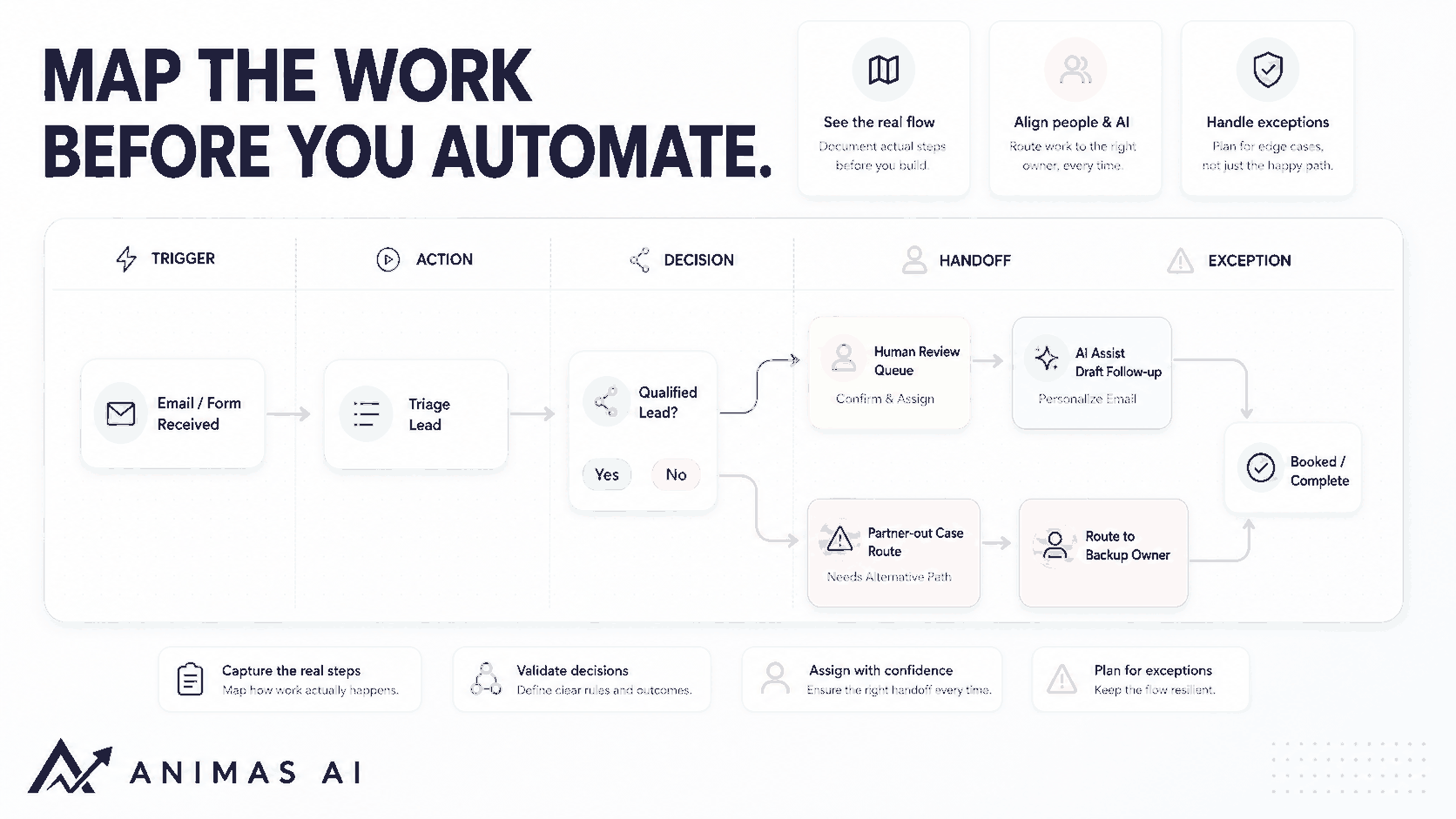
Quick answer
Workflow mapping is the step most teams skip before adding AI. Before you wire up an agent, map out triggers, decision points, handoffs, exception paths, and human owners. Without a map, automation makes a messy process faster, not better. A clear map shows who touches the work, where it stalls, and which tasks truly need a human. It stops you from building a fast, messy system.
A realistic workflow example
Say a small agency qualifies inbound leads. A prospect fills out a contact form. The trigger is that form submission landing in a shared inbox. The office manager acts as triage owner, then forwards to the right partner for follow‑up. The decision point: does the prospect fit the ideal client profile on budget, timeline, and service line? The handoff is an email forward with no confirmation or tracking. The exception: when the partner is out, the lead sits unread. The output is either a meeting booked or a polite pass.
If you build an AI agent to draft replies without mapping the handoff, it might generate a great draft nobody sees. The bottleneck is the handoff, not drafting speed. Once you map it, you can add a shared triage queue, a quick human review, and an AI assist that drafts and schedules the follow‑up. That is how Pip works: faster lead response while human judgment stays in the loop.
What breaks in real teams
Three things break when teams skip mapping.
The hidden exception pile. Every team has cases that don’t follow the happy path: a VIP who expects a tailored reply, a sensitive issue that must go to legal, a partner who never checks notifications. Without mapped exceptions, the AI might auto‑reply to a complaint with a sales pitch because nobody flagged the context.
Ownership confusion. Automation tools assign work to a queue, but real work moves because a specific person feels responsible. If maps don’t name a human owner for each review step, tasks stall. The AI routes correctly, but the human never opens the notification. In audits (see AI automation audit for small teams), the top failure mode isn’t the AI; it’s that nobody agreed who pushes the button.
The false assumption of linear flow. A map drawn from memory looks like a neat flowchart. Reality is loops, rework, calls, and Slack DMs. The map must include those informal channels. For example, a manager confirms something via chat before approving. Automating the formal approval form without capturing that side conversation creates a bottleneck.
What to build first
Before you open a no‑code tool or write a prompt, make a one‑page map. It needs five columns:
- Trigger: the exact event that starts the work (email arrival, form submission, status change, time trigger).
- Action: what a person actually does today, not what they should do. Messy is fine.
- Decision: any if‑this‑then‑that branch, especially criteria that require judgment.
- Handoff: who gets the work next and how they’re notified.
- Exception path: what happens when the normal flow fails, who is the backup, the deadline, and how you catch it.
Map five to ten real instances of the workflow. Watch the work happen or trace at least a week of actual tickets and emails. That exposes the informal loops.
Then label each step green (rules‑based, low risk), yellow (needs review, AI can draft), or red (human judgment only). Start with greens and a few yellows. This classification comes from helping teams choose a first AI project (see guide).
What to avoid
Don’t automate before you map the failure state. If you can’t describe what broken looks like, you can’t set up monitoring. Define what a dropped handoff means and trigger an alert when it happens.
Don’t map in a silo. Include the people who break the rules; they know the real decision points. For Masthead, we sat with the operators, not the project lead, and found a manual filter that would have broken the AI pipeline.
Don’t try to map everything. Pick the workflow that hurts most. One clear map beats ten vague diagrams.
Don’t assume AI handles edge cases. Decisions that need deep context stay human. AI can assist until the map proves it holds for those cases.
How Animas thinks about it
At Animas, mapping is the first hands‑on session. We trace the actual movement of work: emails, spreadsheets, verbal handoffs. We look for invisible glue—the person who enforces unwritten rules, the Slack message that triggers a task, the report someone compiles by hand because the export is broken.
That session produces a shared map that defines the agent’s trigger, review step, and fallback routing. For Pip, we started with speed‑to‑lead, but mapping revealed the real bottleneck was triage: partners spent 15 minutes per lead deciding whether to engage. We had Pip pre‑screen leads against the mapped criteria, so partners only reviewed the ones that mattered. The map is kept updated as the business changes.
FAQ
Do I need a workflow map if I am only automating one step?
Yes. Even one step needs the handoff before and after mapped. If the output lands where no one looks, the workflow breaks.
How detailed should the map be?
Detailed enough to see where work stalls. Capture triggers, owners, decisions, handoffs, and exceptions. If it takes more than two hours, you’re over‑engineering.
What if the real workflow is undocumented and people do things differently?
Trace recent examples. Look at the last ten instances. Note variations and let the map show the common path. Include legitimate variations you can define reliably.
Can AI help me create the workflow map?
AI can help structure a map from your notes, but it can’t observe how your team actually works. Use it to clean up a draft, not replace direct observation. Tools like Pip run the workflow later, but the map must be grounded in real behavior.
Source notes
- The green/yellow/red categorization framework emerged from internal Animas AI project kickoffs and has proven useful in audits described in our AI automation audit guide.
- The concept of mapping exception paths before automating is drawn from shipping Pip and Masthead, where ignoring exceptions caused initial handoff failures.
- Observations about team adoption and ownership echo themes from human-in-the-loop AI automation and AI agent handoff workflow.
- For a broader view on operational AI architecture, see AI workflow automation for business operations.

Want this kind of system in your business?
Send the messy workflow. I will help turn it into a practical AI system.
Email Tyler