Human in the Loop AI Automation: What It Means and How to Build It Right
A practical guide to human-in-the-loop AI automation, with real workflow examples, what breaks without it, and how Animas AI designs systems where humans stay in control.
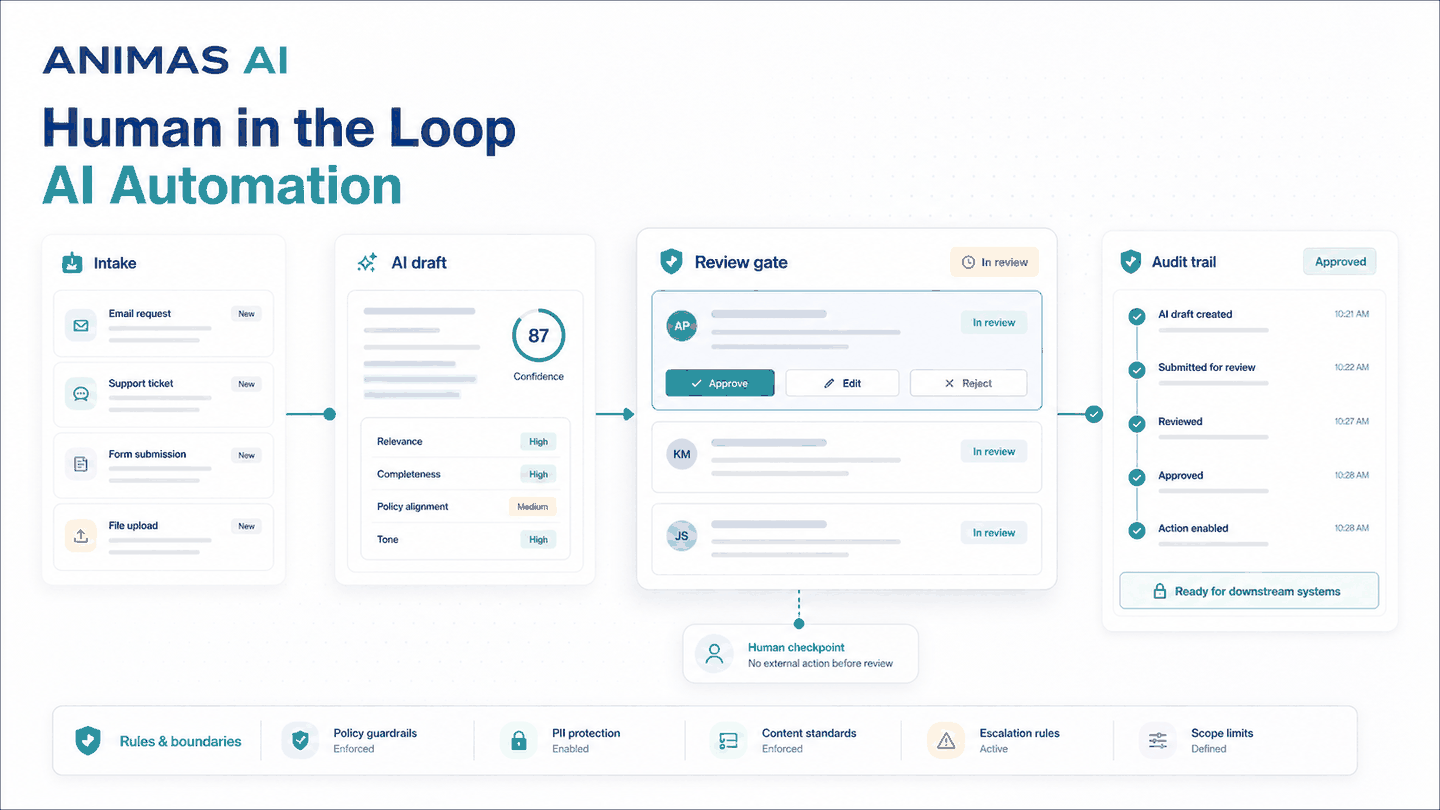
Quick answer
Human-in-the-loop AI automation means an AI system handles routine work such as drafting replies, categorizing leads, and flagging risks, but a human must approve or edit any output that triggers a real-world action. The human acts as a safety net, not a delay. For operations teams with messy inboxes, compliance rules, or high-touch sales, this pattern keeps speed without removing accountability. It automates repetitive steps but keeps human judgment in place.
A realistic workflow example
A consulting firm gets 60 leads each week through its contact form. The leads need qualifying, routing, and a reply within hours. Without a dedicated sales team, the owner and two senior consultants handle this alongside client work. Leads often wait a full day; roughly a third disappear.
A human-in-the-loop workflow looks like this:
Trigger: A new form submission creates a task in an internal pipeline tracker like Pip.
AI draft and scoring: The AI reads the message, identifies the service line, extracts company and role, and drafts a three-sentence reply with a qualification score (hot, warm, cold).
Handoff to a human: The draft, score, and original message appear in a review screen. Nothing is sent automatically. The assigned partner opens the task in their daily review queue.
Human review step: The partner checks tone, verifies routing, and approves, edits, or rewrites. If the score is wrong, they adjust it; that correction feeds a training loop for future accuracy.
Output: The approved email is sent. The partner can add a calendar link or follow-up task. The entire interaction is logged.
Failure path: If the draft is rejected for being off-brand or missing context, the system records the rejection for model tuning. No email goes out unreviewed.
What breaks in real teams
- Rubber-stampers: Reviewers approve everything without reading, letting mistakes slip through.
- Bottleneck reviewer: One person gates every decision; queues pile up when they're unavailable.
- Re-writing everything: Distrust pushes reviewers to retype every reply from scratch, providing zero leverage.
- No feedback loop: Corrections are made in the UI but never improve the model, so the AI repeats errors.
- Missing audit trail: Without logged approvals, human review provides no legal or compliance protection.
- Handoff without context: Reviewers only see AI output, not the original input, confidence, or reasoning.
Any one of these can break trust. The fix is better handoff design, not better AI.
What to build first
Start with a workflow where the action is reversible or low-stakes, the review step is a glance, and you can measure time-to-approval and accuracy.
A common first project is support ticket routing with a human checkpoint. AI categorizes tickets and suggests an owner; a team lead reviews the suggestions, corrects a couple, then bulk-approves the rest. It takes a few minutes for dozens of tickets.
Another is drafting routine client emails: reminders, status updates, follow-ups. AI drafts, the account manager skims, and the email goes out. The review interface must be fast: one-click approve, edit, or reject, or the human will bypass it.
What to avoid
- Fully autonomous actions on sensitive channels. Do not let unreviewed AI email clients or post publicly until the model has proven reliable over time.
- Token-based approvals with no context. Always show original input, AI reasoning, and confidence.
- Long chains of AI steps without a human gate. Insert a review step before external communication.
- Treating the human as a fallback instead of a co-pilot. Design for collaboration, not exception handling.
- Skipping the feedback loop. Every edit, rejection, or override should update your evaluation set.
How Animas thinks about it
When we build these systems at Animas, we start with the review interface. We design what a reviewer needs to see to decide in under 30 seconds: original input, structured AI output, confidence cues, and clear approve/edit/reject actions. In our tools Pip and Masthead, the review screen was designed early, not tacked on later.
We build dedicated review queues, never emailing drafts into cluttered inboxes. Every approve, edit, or reject action is logged with a timestamp and user identity. The logs reveal whether the loop is healthy. Rising rejection rates signal a model that needs tuning. Falling approval times paired with quality declines suggest rubber-stamping.
We start narrow: one workflow, one reviewer, one decision type. Once it proves reliable for a few weeks, we widen the scope. Human-in-the-loop isn’t a switch you flip; it’s a design principle that shapes how the tool is built.
Curious about the pattern in action? See the Pip case study, the Masthead case study, or what we build.
FAQ
What exactly is human-in-the-loop AI automation?
It’s a design pattern where an AI produces outputs (drafts, categorizations, scores) but a human review step is required before any real-world action. The human can approve, edit, or reject the output. The system logs the decision and uses it to improve future outputs.
Why should teams avoid letting AI act autonomously after training it well?
Even highly accurate AI makes plausible mistakes. In operations where the output touches a client, compliance rule, or reputation, an unreviewed error can be expensive. The loop keeps accountability with the people who own the outcome. Over time you might reduce the review frequency, but for actions that affect clients or legal standing, a human check is the safe default.
How do you keep the human reviewer from becoming the bottleneck?
Design the review interface for speed and clarity. Show original input, AI suggestion, and a confidence indicator. Use batch review queues so one person can review many items quickly. Rotate reviewers or use tiered approval to avoid single points of failure. If the queue grows, check whether the AI’s outputs are too hard to evaluate; sometimes the bottleneck means the model needs to deliver cleaner suggestions.
When is it safe to remove the human from the loop?
When the error rate on a specific decision is demonstrably low over a long period, and the cost of an occasional error is acceptable. Some teams automate low-risk decisions while keeping high-risk ones in review. However, safe depends on context: a misrouted support ticket is a nuisance, but a poorly sent apology email can damage a relationship. Always keep an audit trail and a kill switch, even for automated steps.
Does human-in-the-loop work for internal tools, or only customer-facing ones?
It applies wherever a decision matters. We use the pattern in internal tools like Pip, where opportunity qualification requires a human approval before it enters the active pipeline. The same draft-review-act pattern works for operations, content review, and compliance alike.
Source notes
This article draws on shipped Animas AI systems, including Pip and Masthead. The failure modes come from real operational friction observed across small teams building practical AI automation.

Want this kind of system in your business?
Send the messy workflow. I will help turn it into a practical AI system.
Email Tyler