When Not to Automate a Business Process with AI
AI automation isn't always the right answer. This guide walks through when to hold off, what breaks when you rush in, and how to build a safe, human-in-the-loop starting point for messy, real-world processes.
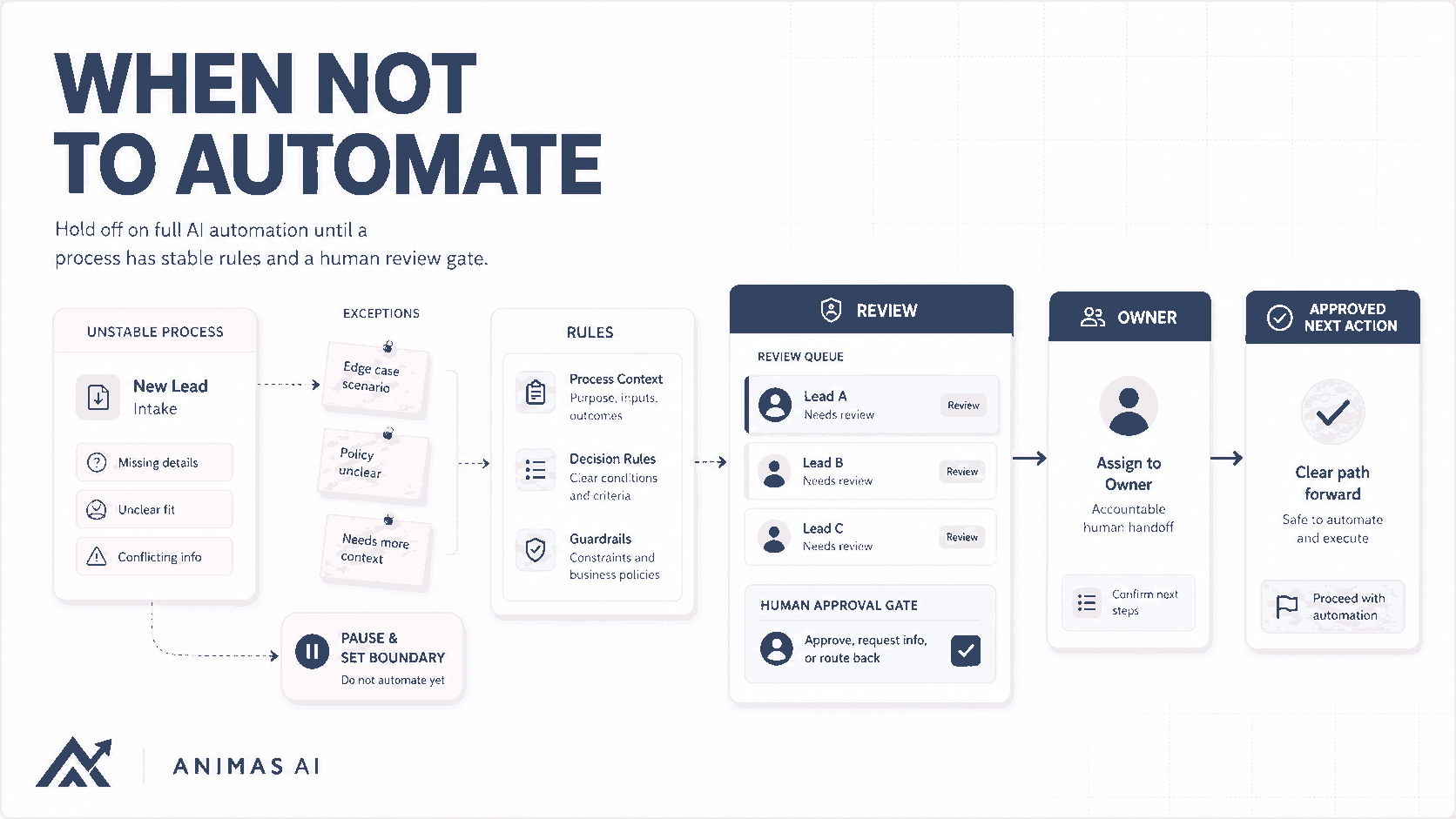
Quick answer
Don’t automate a process that’s still unstable, low-volume, heavily reliant on human judgment, or carries a high cost of error. If the owner can’t write down the exact rules or makes exceptions all the time, AI will make the mess worse. A well-placed review step and a lightweight human-in-the-loop design usually beats a premature, fully automated pipeline. Build for clarity first, then add automation where it reduces toil without creating new risk.
A realistic workflow example
A 12-person consulting firm routes every inbound lead through the founder’s inbox. The founder scans each email, decides if it’s worth a call, and forwards it to a senior consultant or archives it. No one has written down the criteria. The handoff happens over email or Slack with no shared review step or audit trail.
The team pipes incoming emails through an LLM that extracts the ask, creates a deal in the CRM, and assigns a priority score. The model produces scores from surface signals like word count, domain, or mentioned budget figures and often fabricates a need that doesn’t exist. Within two weeks, three high-value leads sat untouched while eight low-quality leads consumed consultant time. The founder lost trust, rechecked every score, and turned the automation off.
The problem wasn’t the model’s capability. It was applying automation to a process that depended on personal judgment and had never been stabilized.
What breaks in real teams
- Unwritten rules. If the decision rules exist only in someone’s head, the model fills in the gaps with guesses that miss what the business actually needs.
- Exception-heavy workflows. Seemingly repeatable processes hide a long tail of edge cases: the client who always gets a discount, the invoice in a weird format, the partner who must be CC’d. Automation that can’t handle those exceptions creates cleanup work that erases any time saved.
- Eroded trust. A few wrong outputs kill adoption. Team members start double-checking every AI action, often taking longer than doing the original work manually.
- Hidden consequences. Automating one step can quietly break downstream handoffs. A misrouted lead might land in the wrong pipeline, trigger an irrelevant onboarding sequence, and confuse a real person who has to apologize.
- Volume mismatch. A process that runs three times a week rarely justifies the effort to build and maintain a reliable AI system. Spend that time on high-volume, repetitive steps where an 80% accurate assistant still saves hours.
What to build first
Start with a process playbook, not a model. Document the trigger, owner, expected states, and handoff rules. If a second person can’t run the process from the playbook and produce the same outcome 90% of the time, the process isn’t stable enough to automate.
Then introduce a human-in-the-loop scaffold that offloads the dullest parts without removing judgment. In the lead qualification example, an AI-generated summary and a suggested priority land in a shared Slack channel where the founder taps an emoji to approve. The owner stays in control, the team sees the decision, and the model receives real-world feedback that makes it better over time.
This is the pattern used inside the Pip lead-routing system. The initial build surfaced the right information, applied an explicit rule the team had agreed on, and kept a short approval step where the founder could override. Full automation only arrived once the rules were stable and the override rate dropped below 5%.
What to avoid
- Automating a broken process. If the manual flow is painful and inconsistent, putting AI on top creates a faster, larger version of that pain. Fix the process first.
- Removing the human from high-risk decisions. Keep a human in the loop for any step where a mistake costs money, damages a relationship, or creates a compliance risk. Wait until reliability is measured objectively, and always maintain an override path.
- Building for edge cases too early. Ship a system that works for the common path and alerts a human when it falls into the unknown.
- Ignoring the maintenance tax. AI-driven workflows need ongoing monitoring, prompt tuning, and output reviews. Treat them like any operational system with a clear owner and a lightweight feedback loop.
How Animas thinks about it
At Animas AI, we assess a process the way a builder inspects a foundation before putting up walls. Three questions come first: Is the trigger consistent and machine-readable? Is there a clear owner who can define the correct output? Is the cost of a mistake acceptable enough to let a machine try?
If any answer is “no,” we don’t start with full automation. We start with a squint test: can a human write down the rule clearly enough that another human could replicate it? If not, no amount of prompt engineering will get the model there.
Then we design a system sketch (trigger, owner, handoff, review state, output, failure path) and always put a human gate before the output touches a customer, a lead, or a financial record. Even in systems like Masthead, where AI drafts media monitoring reports for PR teams, an editor always has final approval before the report is sent to a client.
This approach keeps the build small, safe, and shippable in weeks instead of months. The goal is to remove the toil that keeps people from higher-value work, not to remove the people. When that principle is baked in from day one, teams adopt the automation instead of fighting it. You can see more of this philosophy in the way we talk about What I build.
FAQ
What types of processes should never be fully automated with AI?
Processes that require empathy, deep creative judgment, or one-off relationship calls rarely benefit from full automation. Examples include sensitive client conversations, final contract negotiations, performance reviews, and any step where the output can’t be clearly verified without a human. In those cases, AI works best as a drafting assistant, not a decision-maker.
How do I know if my process is stable enough for automation?
Grab a colleague and ask them to run the process using only a written playbook. If they produce the same output as the current owner on at least 9 out of 10 tries, the process is probably stable. If they can’t, or if the owner keeps making on-the-fly exceptions, start by documenting the rules and removing hidden dependencies before you involve any AI.
Can AI help with a process that isn’t fully ready for automation?
Yes. This is exactly where a human-in-the-loop setup shines. Let the AI handle the repetitive parts (extracting data from emails, formatting summaries, suggesting a next step) while keeping a person as the final gate. You get speed and consistency without giving up control. This is the default starting point for most workflows we build at Animas, and it often stays that way even after the system matures.
What about low-volume processes: are they ever worth automating?
Probably not, unless the process is extremely high-stakes and even a single mistake justifies the build. Automation effort typically scales with the number of edge cases, not just the volume of executions. If a task happens a few times a week and takes under 10 minutes, a good checklist or template is often the better investment.
Source notes
- This guidance is drawn from shipped systems like Pip and Masthead, where we explicitly chose human-in-the-loop designs over fully autonomous workflows.
- The “process playbook” test and squint rule come from Animas’ internal discovery work with operational teams.
- For a deeper look at designing safe handoffs, see our AI Agent Handoff Workflow article.
- The lead qualification failure example reflects recurring patterns we’ve seen in real automation projects, anonymized and simplified.

Want this kind of system in your business?
Send the messy workflow. I will help turn it into a practical AI system.
Email Tyler